

How to Create Long-Form Faceless YouTube Videos with AI (A Beginner's Guide)
Turn your text into long-form faceless videos with professional quality — no technical skills or editing experience required.
Starting a faceless YouTube channel is one of the most accessible ways to build an audience today. You don't need expensive camera gear, a lighting studio, or on-camera charisma. Instead, your script and your storytelling become your moat.
But while the barrier to entry is lower than ever, the actual production process can still stall beginners who get caught juggling multiple software tools. This guide breaks down how to bypass the "blank-page problem" and turn a single idea into a polished, long-form video using the Crreo AI text-driven workflow.
Why Is It So Hard to Start a Faceless YouTube Channel?
Starting a faceless YouTube channel sounds simple in theory — you don't need a camera, lighting, or to show your face. But for beginners, the real difficulty begins after the idea stage.
The Blank-Page Problem
Beginners often struggle to turn a single idea into a structured long-form video. The main challenges include organizing content into logical sections, managing pacing, and matching visuals with narration. Without a clear framework, production slows and becomes fragmented.
This "blank-page problem" is one of the main reasons beginner faceless channels never publish consistently.
Without a clear starting point, creators often spend hours planning — and never actually produce a complete draft.
An AI-assisted workflow like Crreo reduces this friction by turning a single topic into a structured draft that includes script, voiceover, scenes, and supporting assets. Even a simple, unstructured idea becomes a starting point that users can refine and expand step by step, similar to assembling Lego blocks — a process that is significantly easier than beginning from a blank page.
The Tool-Juggling Problem
Most beginner faceless creators end up switching between:
-
A script-writing tool
-
A voice generation tool
-
AI B-roll generator
-
A stock footage platform
-
A video editor
-
A thumbnail tool
Using separate tools creates coordination complexity. Narration timing may not align with visuals, stock footage, or AI-generated clips, which require manual trimming, and stylistic consistency across scenes becomes difficult to maintain.
For long-form faceless videos, this fragmentation increases production time and introduces repeated adjustments across platforms. As video lengths increase, workflow inefficiencies become more apparent.
An all-in-one solution like Crreo simplifies this process by handling script generation, voiceover, visuals, and basic editing in a single guided environment. Instead of assembling pieces from different platforms, beginners can focus on refining content rather than managing software.
Lack of a Clear, Repeatable Workflow
Faceless content requires consistency, but many beginners lack a repeatable production system. Without a defined structure, each new video requires reorganizing scripts, visuals, and narration from scratch.
What most beginners benefit from is not advanced editing complexity, but a guided workflow that:
-
Turns one idea into a structured script
-
Aligns narration and visuals
-
Reduces repetitive technical adjustments
-
Supports consistent publishing
Crreo integrates script generation, voiceover, visuals, and editing within a single workflow. This reduces fragmentation and makes production more predictable.
Key Features to Look For in a Faceless Video Generator
When choosing an AI video generator for beginner faceless creators, certain features significantly reduce complexity and improve consistency. The most useful tools are those that simplify production while maintaining narrative structure and visual coherence.
Before diving into the mechanics of each, here are the core capabilities that will actually save you time and prevent burnout:
-
Flexible Scripting: The system should adapt to you, whether you need an AI to outline a fresh idea or you want to paste your own pre-written scripts.
-
Smart Storyboarding: Look for AI that automatically breaks your long text into logically paced scenes, so you aren't guessing where to make visual cuts.
-
Visual Persona Consistency: The tool needs to remember what your characters and visual style look like throughout the video to prevent jarring style shifts.
-
Auto-Synced Audio: Built-in voices and background music should automatically align with your text to eliminate manual timeline dragging.
-
Built-in Publishing Assets: Subtitles, titles, and thumbnails should be generated alongside the video so you don't have to learn separate design software.
Script-to-Video Generation (Auto Script & Manual Script)
Faceless creators typically struggle at two different starting points: either they don't know how to structure an idea into a video, or they already have a script but lack the workflow to turn it into a watchable format. For beginners, having a system that addresses both scenarios is essential.
Crreo supports both entry points through Auto Script and Manual Script modes, powered by the same AI Director system.
In Auto Script Mode, creators can enter a simple topic and customize duration, tone, audience, and language. This allows a rough concept to evolve into a structured draft without facing the blank-page problem.
In Manual Script Mode, creators can paste their own script and retain full control over wording and narrative direction. The system then translates that text into a structured video draft, removing the need to manually convert written content into video pacing and flow.
By supporting both idea-first and script-first workflows, Crreo reduces friction at the earliest and most fragile stage of faceless production.
Automated Storyboard and Scene Structuring
A faceless video generator should do more than divide text into scenes. It should reduce cognitive overload, maintain pacing, simplify asset sourcing, and preserve narrative coherence.
Crreo's AI Director–powered storyboard system addresses these needs within a structured workflow.
- Reducing Visual Decision Fatigue
With long scripts, beginners face constant scene decisions — what visual fits each sentence, when to change shots, and how transitions should flow.
The system analyzes the script and breaks it into logically connected scenes, allowing creators to refine a structured draft instead of starting from a blank screen.
- Improving Pacing
Scene changes follow narration rhythm, preventing visuals from lingering too long or shifting too abruptly.
- Eliminating Asset Searching
Visuals are generated during storyboard creation, reducing the need for manual searching, downloading, and alignment.
- Maintaining Narrative Flow
Beginners often optimize scene-by-scene and lose overall consistency. Scenes are structured around the full script, supporting smoother transitions and clearer storytelling.
By structuring scenes, aligning rhythm, and generating visuals automatically, the storyboard system turns complex editing decisions into a guided process for faceless creators.
Built-In Voiceover Generation and Multilingual Localization
Integrated voiceover generation allows creators to produce narration directly within the same workflow, removing the need to export scripts to external tools and re-import audio files.
In 2026, a strong faceless video generator should support seamless multilingual localization — allowing creators to translate one script into multiple languages and generate localized voiceovers while maintaining tone and pacing.
Crreo supports this with over 250 natural-sounding global voices. Creators can transform a single script into multilingual versions within the same production system.
For beginner faceless creators, this enables global audience reach without multiplying production effort. One script can scale across regions, expanding potential distribution while keeping the workflow unified.
For faceless channels where narration drives the story, built-in multilingual voice generation supports both production efficiency and international growth.
Character Design and Visual Consistency
Character design and visual consistency are foundational for faceless channels. While the creator does not appear on camera, the character often becomes the visual anchor of the channel. Without a stable design system, videos can feel fragmented, weakening recognition, professionalism, and audience trust.
Crreo addresses this with a structured character system built for both beginners and long-term creators:
- 50+ Ready-to-Use Templates
Creators can start immediately without sourcing or designing characters from scratch.
- Full Customization Control
Adjust appearance, style, and attributes to align with both niche positioning and script-driven narrative needs.
- Photo-Based Mode (Pro Plan)
Upload images for tighter control and personalized visual identity.
- Visual Consistency Across Scenes
Characters remain stable throughout the video, preventing style shifts and disconnected visuals.
- Save to "My Library" for Reuse
Store and reuse characters across projects, turning recurring visuals into scalable brand assets.
For beginners, this reduces the need to recreate characters for every project while providing structured visual support from the start. For growing channels, the system offers character diversity and expanded creative control — allowing creators to refine, evolve, and scale their visual identity over time.
Character design functions not just as a visual element, but as a flexible and reusable brand asset that supports long-term consistency while preserving creative freedom.
Automated Background Music and Sound Effects
A faceless video generator should be able to automatically generate background music and sound effects that match the context and emotional tone of the script. Creators should not need to manually search for tracks, adjust timing, or manage separate audio layers.
Crreo generates tone-matched background music and sound effects within the same workflow. Voiceover, visuals, and music remain synchronized automatically, helping maintain consistent pacing and atmosphere across scenes.
For beginner creators, copyright risk is another important consideration. Unlicensed music can lead to claims or monetization issues. Crreo provides built-in background music and sound effects designed for commercial use, reducing copyright exposure and supporting monetization eligibility from the beginning.
By combining contextual audio generation, automatic alignment, and licensed assets, Crreo simplifies sound design while supporting production stability and platform compliance.
Built-In Editor with Automated Timeline Alignment
A beginner-friendly faceless video generator should include a built-in editor that simplifies post-production instead of requiring manual timeline management.
Crreo includes a built-in editor designed specifically for faceless creators. Rather than manually arranging clips and syncing audio, the system automatically aligns visuals, AI voiceover, background music, and scene transitions within a structured timeline.
Creators can review the full timeline and make light refinements — adjusting scenes, swapping visuals, or fine-tuning audio — without rebuilding the entire structure.
For beginners, this reduces editing complexity and minimizes reliance on external editing software. Production shifts from manual construction in third-party timeline editors to guided refinement within an integrated workflow.
Automated Subtitles, Titles, and Thumbnails
Publishing a faceless video involves more than production. Subtitles, titles, and thumbnails directly influence accessibility, engagement, and discoverability.
- Automatic Subtitles
Crreo's automatic subtitle engine eliminates hours of manual transcription and timeline adjustment by aligning text directly with AI-generated narration.
Beyond accessibility, integrated subtitles provide a persistent visual anchor for viewers watching in silent environments or on mobile devices. By synchronizing captions with voiceover, Crreo improves clarity, supports retention, and enhances content indexability for YouTube and AI-driven search systems.
- AI-Generated Titles
Crreo generates structured titles based on the script and video context, helping creators move efficiently from production to publishing without manual optimization research.
- Auto-Generated Thumbnails
Thumbnail drafts are generated to align with the script theme and visual tone. Compelling thumbnails support click-through rate, engagement, and conversion without requiring external design tools.
By integrating subtitles, titles, and thumbnails into the same workflow, Crreo streamlines the transition from creation to distribution. For beginner faceless creators, this reduces publishing friction while supporting professional, standardized output.
What Is the Best AI Video Generator for Beginner Faceless YouTubers?
For early-stage faceless creators, effectiveness depends on reducing friction from idea to publish-ready video while maintaining consistent output over time.
The best AI video generator for beginner faceless YouTubers is therefore one designed around accessibility, workflow integration, production stability, and sustainable pricing. Crreo is built around this beginner-first production model.
Designed for Non-Technical Creators
Traditional non-linear production workflows require creators to manage the entire process — including script writing, generating or sourcing materials, arranging clips, controlling the timeline, syncing audio and visuals, adjusting pacing, and handling rendering settings.
For beginners, this often means spending significant time learning complex tools before focusing on the actual content.
Crreo simplifies this process by transforming video production into a text-driven workflow. Creation begins with the script. When text is written or revised, scenes are automatically generated, visuals are organized, pacing is adjusted, and narration is aligned.
Most technical micro-decisions — including scene segmentation, visual rhythm control, and voice pause alignment — are handled automatically in the background.
By shifting to text-driven video creation, Crreo significantly lowers the technical barrier and allows creators to focus on ideas rather than technical skills.
Ease of Use Through Structured Workflow
Many AI tools provide a chat interface or an open editing space, leaving users to determine the next steps on their own. For beginners, this can sometimes create uncertainty about how to proceed.
Crreo adopts a guided creation workflow rather than relying on an open-ended starting point. Instead of beginning with a blank editor, users move through clearly defined stages:
-
From topic to structured script
-
From script to storyboard
-
From storyboard to synchronized visuals and narration
-
From draft to finalized video
Each step is supported by a built-in AI structure. The system does not simply generate output — it organizes the process.
Rather than exploring an undefined space, creators build within a defined workflow. This guided progression reduces confusion and makes production more approachable for beginners.
All-in-One Integration Instead of Tool Assembly
Faceless video production often involves multiple tools — one for script writing, another for voice generation, a platform for sourcing visuals, and separate software for editing and final assembly.
Switching between platforms introduces hidden friction. Content must be exported, imported, reformatted, and manually aligned. When the script changes, visuals and narration often require additional adjustments.
Crreo operates within a closed production loop. Script editing, voice generation, visual alignment, and scene organization happen inside the same environment. When text is revised, narration and visuals can be regenerated and realigned without cross-platform transfers.
Video updates function similarly to document editing: changes made at the text level propagate through the structure.
By centralizing the workflow, the system reduces tool-switching overhead and allows each step to operate within one coordinated process.
Stability, Repeatability, and Scalability
Producing a single video is different from sustaining a channel.
When video creation depends heavily on manual setup, maintaining consistency across multiple uploads becomes difficult. Structure, pacing, and visual style can vary from video to video.
Crreo introduces repeatability through system-level settings. Global configurations defined in Step 1 apply to the entire project, while character and scene settings in Step 2 maintain visual and narrative consistency throughout the video.
Because structure is embedded into the workflow, each new video follows the same organized process. Script segmentation, scene layout, narration alignment, and pacing remain consistent across productions.
This systemic capability allows creators to move from individual, manual effort toward structured output. As more videos are produced, quality and format remain stable without rebuilding the process each time.
Repeatability supports consistency. Consistency enables scalable publishing.
Accessible Pricing for Early-Stage Creators
Beginner faceless creators often operate before monetization begins. High subscription tiers, usage-based fees, or add-on charges can create early financial barriers.
Crreo offers an accessible pricing structure for early-stage creators, including a free plan for experimentation and paid plans starting at $14 per month. Pricing is transparent, with clear usage limits.
This structure allows creators to experiment, iterate, and re-render longer projects without worrying about escalating per-minute costs. Instead of limiting creative exploration, the pricing model supports consistent production.
Lower financial friction makes it easier for early-stage channels to grow sustainably.
How to Create Long-Form Faceless Videos Using AI (Step-by-Step)
For beginner faceless creators, success depends less on performance and more on structure. Without a face or on-camera personality, the video relies entirely on clear scripting, engaging visuals, and consistent pacing.
A structured script-to-video workflow turns this complex process into a repeatable system. Instead of generating random clips or assembling stock footage manually, Crreo processes your video as a single, coherent project.
Here is a step-by-step guide to creating long-form faceless content using Crreo, designed to keep production simple, consistent, and scalable for beginners.
Step 1: Start with an idea or a full script
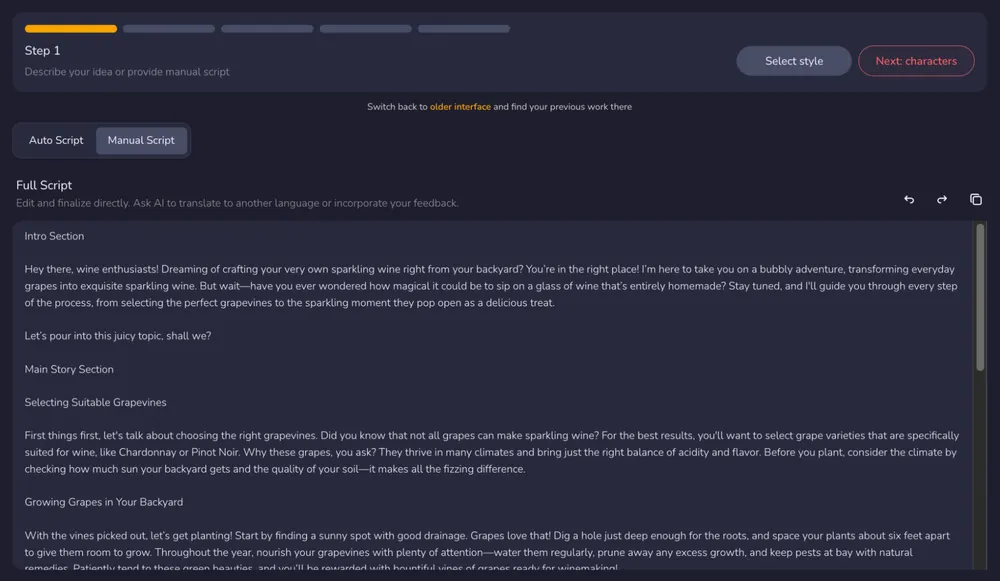
The foundation of any faceless video is the script. With Crreo, you can start from a blank slate or a finished draft. The platform offers two primary entry points:
-
Auto Script mode: Enter a simple topic or concept. Crreo will outline and generate a structured script tailored to your specific audience and tone.
-
Manual Script mode: If you prefer full control or already use an external writing tool, paste your complete script directly into the editor.
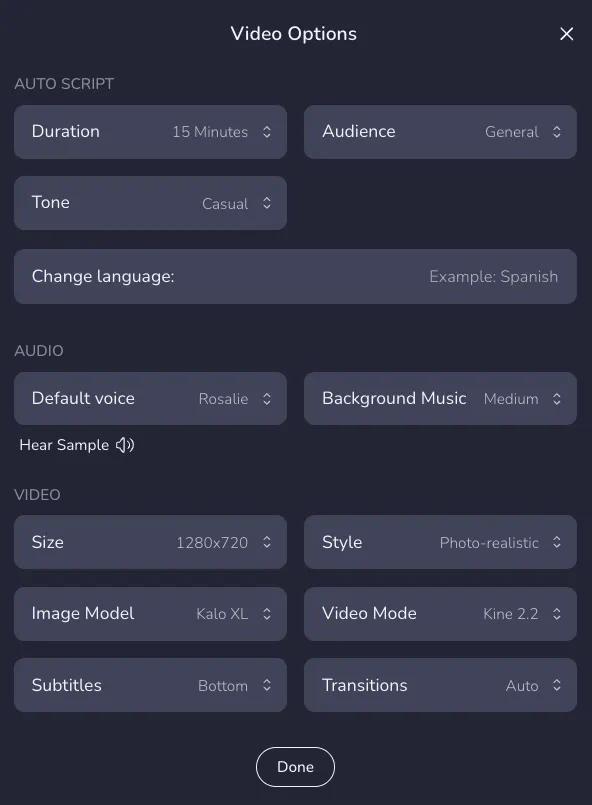
Once the script is in place, you configure the project’s foundation:
-
Define the video’s style, tone, and language.
-
Select a voice profile that matches the channel’s identity.
-
Set the target duration to guide pacing.
By establishing these parameters upfront, the entire video is planned as a cohesive unit rather than a collection of separate pieces. 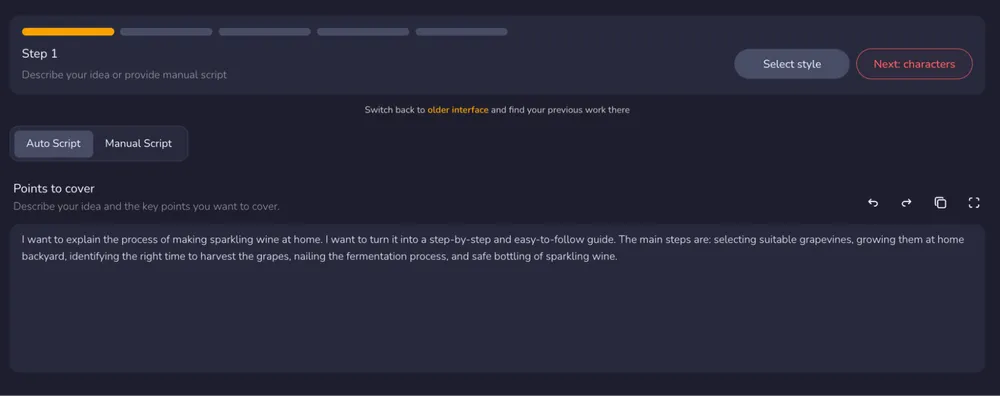
Step 2: Add Characters (Optional)
Faceless does not mean visually anonymous.
In long-form videos, recurring characters can create familiarity and help viewers build recognition over time. Even without a real person on camera, a consistent visual presence can strengthen brand identity.
That said, characters are optional.
When to Use Characters
Consider adding characters if:
-
Your content follows a narrative or storytelling format
-
You want a recurring host figure
-
You aim to build long-term visual recognition
-
You want dialogue-based scenes For documentary-style or explainer content, you may choose to rely purely on contextual visuals instead.
How Character Design Supports Long-Form Content
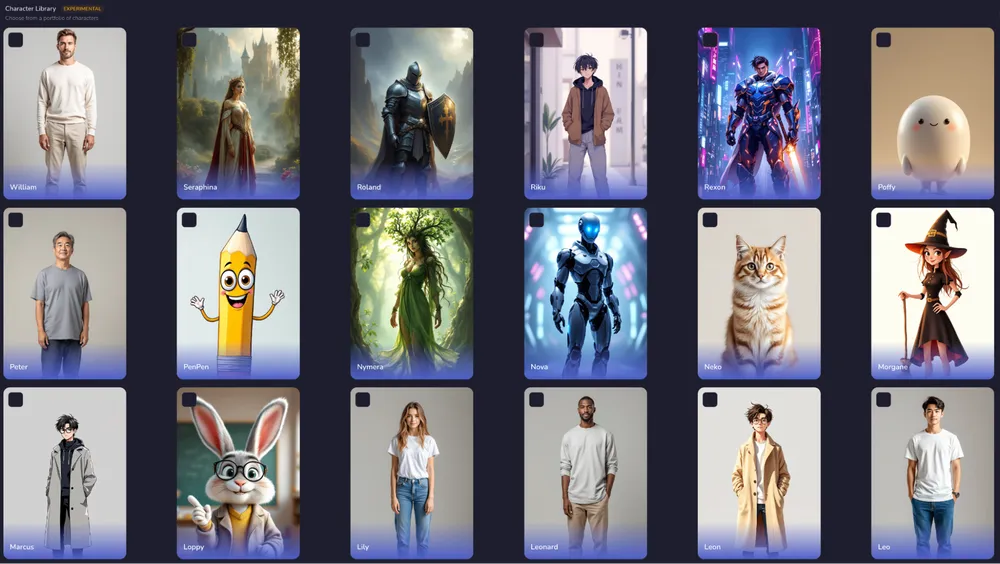
Crreo allows you to:
-
Select from ready-made templates
-
Create fully customized characters
-
Upload photos for tighter control (Photo-Based Mode)
-
Store characters in your library for reuse
More importantly, characters remain visually consistent across scenes.
For long-form faceless videos, this prevents a common issue: style drift. When visuals shift unpredictably, audience immersion weakens.
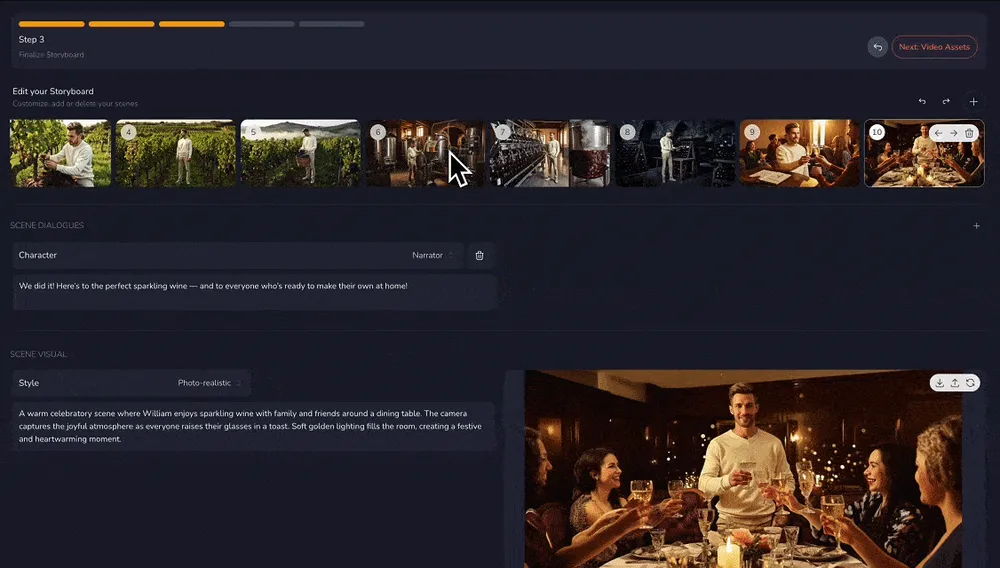
Step 3: Generate and Edit the Storyboard
Once the script is confirmed, it is converted into a structured storyboard.
For long-form faceless videos, this is where pacing and clarity are shaped.
The video is broken into logical scenes. Each scene contains:
-
A specific narrative segment
-
A corresponding visual
-
A defined moment in the overall flow
Your role here is not to build scenes from scratch — it is to refine structure.
Review Scene Flow
Ask yourself:
-
Does each scene clearly support the point or narrative being made?
-
Are transitions smooth between ideas?
-
Does the visual change often enough to maintain attention?
In long-form faceless content, static visuals that linger too long reduce retention.
At the same time, abrupt scene changes can break immersion.
The storyboard stage helps you balance rhythm.
Adjust Dialogue and Visual Alignment
You can:
-
Edit narration text
-
Regenerate visuals
-
Reorder scenes
-
Add new scenes
-
Remove unnecessary scenes
Because the storyboard reflects the full script structure, adjustments remain aligned with the overall narrative.
This prevents the common beginner mistake of optimizing one scene while weakening the flow of the entire video.
Step 4: Review and edit all assets in one timeline
At this stage, your video is structurally complete.
Now the goal shifts from building to refining.
Long-form faceless videos depend on rhythm.
Even small timing adjustments can change viewer retention.
Inside the integrated timeline, you can review:
-
Visual pacing
-
Voiceover flow
-
Background music and sound effect balance
-
Scene transitions
Instead of rebuilding scenes in external editing software, you make controlled refinements within the same project.
Focus on Pacing and Flow
Watch the video as a viewer would. Ask:
-
Does any scene stay on screen too long?
-
Does narration feel rushed at any point?
-
Does the emotional tone shift naturally?
Small adjustments — shortening a scene, swapping an image, softening background music — can significantly improve immersion.
Fine-Tune Without Breaking Structure
Because visuals, voiceover, music, and subtitles are aligned inside one timeline, changes remain synchronized.
You are not reconstructing the video.
You are polishing an already structured narrative.
This is especially important for long-form videos, where cumulative micro-frictions can affect watch time. 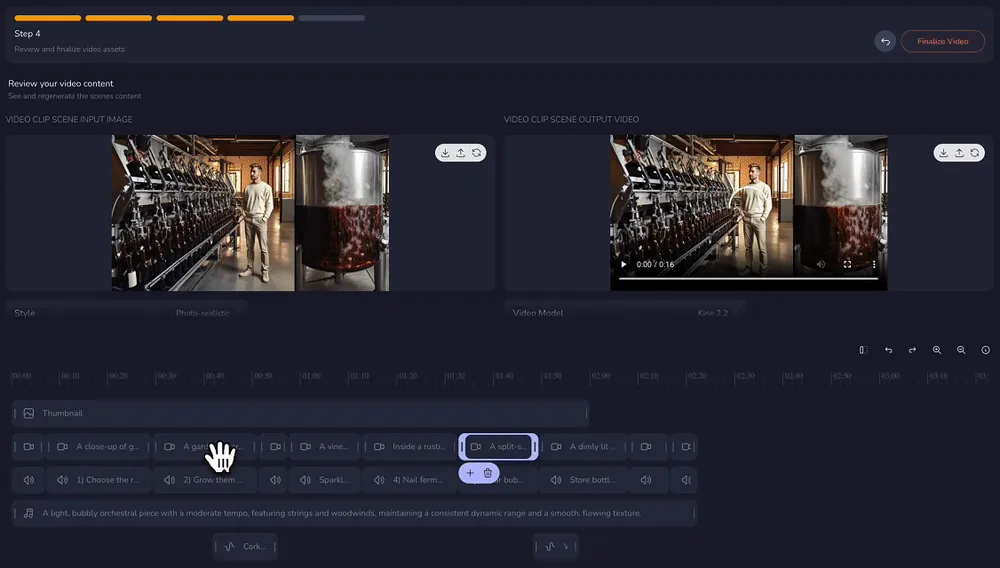
Step 5: Preview, Download & Share
At this stage, your long-form faceless video is complete.
Before exporting, watch it once from beginning to end — as a viewer.
Check:
-
Does the opening hook feel strong?
-
Does pacing stay consistent throughout?
-
Does the ending leave a clear takeaway?
Long-form faceless videos rely heavily on structure and retention. A final preview helps ensure the narrative holds together.
Finalize Thumbnail, Title, and Subtitles
For faceless creators, clickable presentation matters even more.
Crreo generates:
-
A thumbnail
-
A title
-
Subtitles aligned with narration
If you're not satisfied, you can adjust or regenerate them directly inside the workspace — without leaving the project.
For beginner creators, this reduces the need to use separate design or transcription tools and keeps everything aligned with the video's tone.
Export and Publish
Once everything feels cohesive, export your video and upload it to YouTube.
Because thumbnail, title, and subtitles are created within the same workflow, publishing becomes a continuation of production — not a separate technical task.
For long-form faceless channels, shortening the distance between creation and publishing supports consistent output over time. 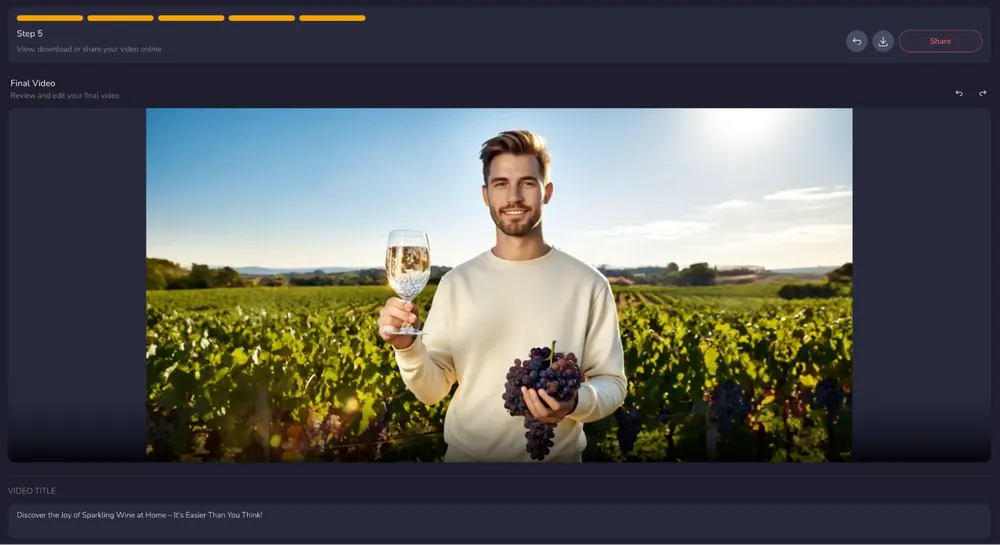
How Long Does It Take to Create a Faceless YouTube Video with AI?
The time required to create a faceless YouTube video depends on video length, complexity, and workflow structure. In many cases, system design matters more than individual tools.
Traditional Multi-Tool Workflow
When using separate tools for scripting, voice generation, visual sourcing, and editing, production can take several hours — even for a relatively simple video. Coordination across platforms increases revision time and manual adjustments.
Crreo AI Workflow
In Crreo, script, visuals, and narration are generated and aligned within the same environment. Text updates automatically realign scenes and voice, reducing the need to manually rebuild sections after revisions.
What Saves Time?
Time savings primarily come from reducing coordination overhead. When production is centralized and structured, fewer manual adjustments are required and revisions become significantly more efficient.
| Stage | Traditional Multi-Tool Workflow | Crreo AI Workflow |
|---|---|---|
| Script Creation | Written manually in a separate tool | AI generates a structured draft from topic input |
| Storyboard Creation | Manually divide script and assign visuals | Script automatically segmented into scenes |
| Visual Sourcing | Search stock footage or AI clips manually | Visuals generated and mapped to scenes automatically |
| Voice Generation | Export script to voice tool and re-import audio | Voice generated and aligned within the same system |
| Sync & Editing | Manual timeline adjustments required | Text updates automatically re-align visuals and narration |
| Revision Process | Rebuild sections across multiple tools | Edit text and regenerate within one workflow |
| Tool Count | 6+ Separate tools | 1 Integrated platform |
| Learning Curve | Weeks to Months | Minutes |
| Total Cost | High (Multiple Subscriptions) | Low (All-in-One Pricing) |
| Total Time (10–30 min video) | 2 – 4+ hours | 10–30 minutes |
Disclaimer: Total time estimates are based on internal benchmarks for creating a 10–30 minute video. Actual production time may vary depending on script complexity, specific visual requirements, and user expertise. The 10–30 minute workflow in Crreo covers the automated process from initial prompt to a complete first draft.
Can You Monetize AI-Generated Faceless Channels in 2026?
Yes — a faceless YouTube channel is typically eligible for the YouTube Partner Program in 2026, provided it meets YouTube's eligibility requirements and content policies.
Monetization does not depend on showing your face. It depends on watch time, subscriber growth, and compliance with platform guidelines.
As of recent policy updates, channels generally need:
-
1,000 subscribers
-
4,000 public watch hours in the past 12 months, or
-
10 million Shorts views within 90 days
For complete requirements and the most up-to-date information, consult YouTube's official Partner Program documentation.
Real Example: Growing a Beginner Faceless Channel with AI
A real case from the Crreo community demonstrates that even beginner creators can build competitive faceless YouTube channels using a structured AI workflow.
Case Overview: From 0 to 3,000 Subscribers in Six Months
Eduardo, a creator focused on Spanish-language faith-based content, used Crreo as his primary production system. Over a six-month period, he achieved:
-
Subscriber Growth: Nearly 3,000 YouTube subscribers
-
Monetization Milestone: 4,000 watch hours, qualifying for YouTube monetization
-
Production Efficiency: Reduced a traditionally 3–4 hour multi-tool workflow to approximately 15–30 minutes within an integrated AI system
Growth was not driven by viral spikes, but by consistent publishing supported by a repeatable workflow.
Why This Workflow Worked
In this case, Crreo functioned as an integrated production system rather than a single-feature tool. Several structural factors supported sustainable growth.
1. Narrative Consistency
Visuals were organized according to the overall script structure. Because the system aligned pacing and narration automatically, long-form faceless storytelling remained coherent and stable across videos.
2. Reduced Hidden Friction
Script writing, voice generation, visual alignment, and scene organization occurred within the same environment. This eliminated repeated exporting, importing, and manual re-synchronization across tools.
Production became continuous rather than fragmented.
3. Repeatable Output Structure
Once a clear niche was defined and the first video format was established, subsequent content followed the same structured workflow. Format, pacing, and narrative logic remained consistent.
Instead of rebuilding the process each time, new videos were produced within an existing framework. This repeatability made steady output sustainable.
What Beginner Creators Can Learn
This case highlights several practical insights:
-
Consistency matters more than spontaneity. Regular publishing builds momentum over time.
-
A repeatable system reduces burnout. Structured workflows support long-term output.
-
Focus on ideas, not tools. Minimizing technical overhead improves content quality and audience relevance.
The growth in this case was not the result of isolated automation, but of structural control over the entire production process.
Key Takeaways for Beginners
Growth in this case was enabled by Crreo's text-driven, integrated workflow. By integrating script, visuals, and narration within one guided system, production became repeatable and sustainable — making sustained channel growth more achievable for a beginner faceless creator.
FAQs About AI Tools for Faceless YouTube Creators
Does YouTube penalize videos made with AI video generators?
No, YouTube does not automatically penalize videos created with AI tools.
However, creators must follow platform policies. If content includes realistic synthetic media, proper disclosure may be required. More importantly, videos should avoid repetitive or low-value formats.
AI tools are production methods. Monetization and performance depend on content quality and audience retention rather than the use of AI itself.
Do I need a high-end computer to use Crreo?
No. Crreo works on all major browsers and devices, including mobile. For best performance, use Google Chrome on a desktop with a stable internet connection.
Because processing happens in the cloud, you can manage your entire "video factory" from a standard laptop or even a mobile phone. Some Crreo creators have grown substantial audiences while producing content primarily on mobile devices.
Do I need professional editing skills to create faceless videos with Crreo?
No. Crreo is designed for non-technical creators.
Instead of requiring manual timeline editing and layered asset management, it uses a script-driven workflow. By structuring production around text, the system automatically aligns narration, visuals, and pacing, reducing the need for advanced editing knowledge.
Basic writing and revision skills are sufficient to begin producing faceless content.